
 by
by बिहार सरकार द्वारा नागरिकों को जाति ,आवासीय, आय प्रमाण-पत्र का निर्गमन(Caste, Residential, Income Certificate) की सुविधा प्रदान की जाती है। इन प्रमाण-पत्रों का उपयोग शिक्षा, छात्रवृत्ति, सरकारी योजनाओं, आरक्षण तथा अन्य प्रशासनिक कार्यों में किया जाता है।
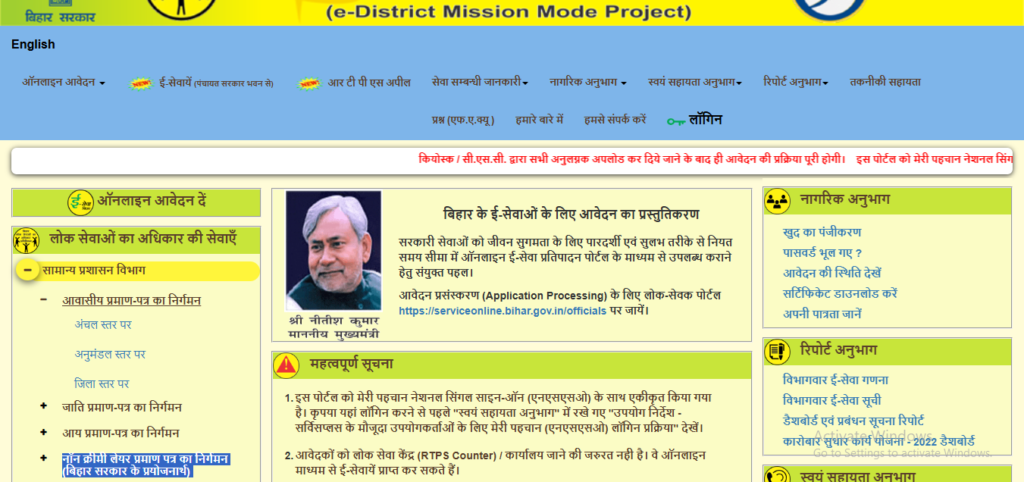
| ऑनलाइन आवेदन करने का आसान तरीका (Step-by-Step) How to Apply Online – Step by Step Onlineduniya.in |
| ✅ ऑनलाइन आवेदन करने का आसान तरीका (Step-by-Step) Step 1: वेबसाइट खोलें सबसे पहले RTPS बिहार सेवा पोर्टल खोलें। यह बिहार सरकार की आधिकारिक नागरिक सेवा वेबसाइट है। Step 2: लॉगिन या रजिस्ट्रेशन करें Citizen Login पर क्लिक करें अपना मोबाइल नंबर दर्ज करें मोबाइल पर आए OTP को डालकर लॉगिन करें 👉 अगर आप पहली बार लॉगिन कर रहे हैं, तो आपका रजिस्ट्रेशन अपने-आप हो जाएगा। Step 3: प्रमाण-पत्र का चयन करें अब जिस प्रमाण-पत्र की आवश्यकता है, उस पर क्लिक करें — 🟢 आवासीय प्रमाण-पत्र 🟢 जाति प्रमाण-पत्र 🟢 आय प्रमाण-पत्र Step 4: आवेदन फॉर्म भरें आवेदन फॉर्म में ध्यान से जानकारी भरें: पूरा नाम (आधार कार्ड के अनुसार) पिता / पति का नाम पूरा पता (ग्राम/वार्ड, पंचायत, प्रखंड, जिला) मोबाइल नंबर प्रमाण-पत्र किस उद्देश्य से चाहिए Step 5: जरूरी दस्तावेज़ अपलोड करें अब मांगे गए दस्तावेज़ अपलोड करें: 📎 आधार कार्ड 📎 राशन कार्ड या वोटर ID (अगर मांगा जाए) 📎 स्व-घोषणा पत्र (Self Declaration) ⚠️ ध्यान रखें: दस्तावेज़ की फोटो/स्कैन साफ हो और सही साइज में हो। Step 6: आवेदन जमा करें एक बार सारी जानकारी दोबारा जांच लें फिर Submit बटन पर क्लिक करें Step 7: आवेदन रसीद डाउनलोड करें आवेदन सबमिट होने के बाद आपको Application Number मिलेगा आवेदन की रसीद (Acknowledgement) डाउनलोड या प्रिंट कर लें Step 8: आवेदन की स्थिति देखें “आवेदन की स्थिति देखें” विकल्प पर जाएँ आवेदन संख्या डालें अपने आवेदन का स्टेटस चेक करें Step 9: प्रमाण-पत्र डाउनलोड करें आवेदन स्वीकृत होने के बाद लॉगिन करें और Download Certificate पर क्लिक करें अपना प्रमाण-पत्र PDF में डाउनलोड कर लें | How to Apply Online – Step by Step Step 1: Visit the Website Open the RTPS Bihar Service Portal, which is the official online service platform of the Bihar Government. Step 2: Login or Create an Account Click on Citizen Login Enter your mobile number Enter the OTP sent to your phone If you are using the portal for the first time, your account will be created automatically. Step 3: Choose the Required Certificate Select the certificate you need from the list: Residential Certificate Caste Certificate Income Certificate Step 4: Fill in the Application Form Enter all details carefully: Your full name (as mentioned on Aadhaar) Father’s or Husband’s name Complete address (Village/Ward, Panchayat, Block, District) Mobile number Reason for applying for the certificate Step 5: Upload Supporting Documents Upload clear copies of the required documents: Aadhaar Card Ration Card or Voter ID (if asked) Self-Declaration Please ensure that the documents are clear and within the allowed file size. Step 6: Submit the Application Check all the information once again. After confirming everything is correct, click on Submit. Step 7: Save the Acknowledgement After submission, an Application Number will be generated. Download or print the acknowledgement receipt for future reference. Step 8: Track Application Status Visit the Check Application Status section. Enter your application number to see the current status. Step 9: Download the Certificate Once the application is approved, log in again. Click on Download Certificate and save the certificate in PDF format. |
| Some Important Links |
| जाति प्रमाण-पत्र (Caste Certificate) | Click Here |
| आवासीय प्रमाण-पत्र (Residential Certificate) | Click Here |
| आय प्रमाण-पत्र (Income Certificate) | Click Here |
| Download Certificate | Download Here |


Hame banana aa gaya ab